
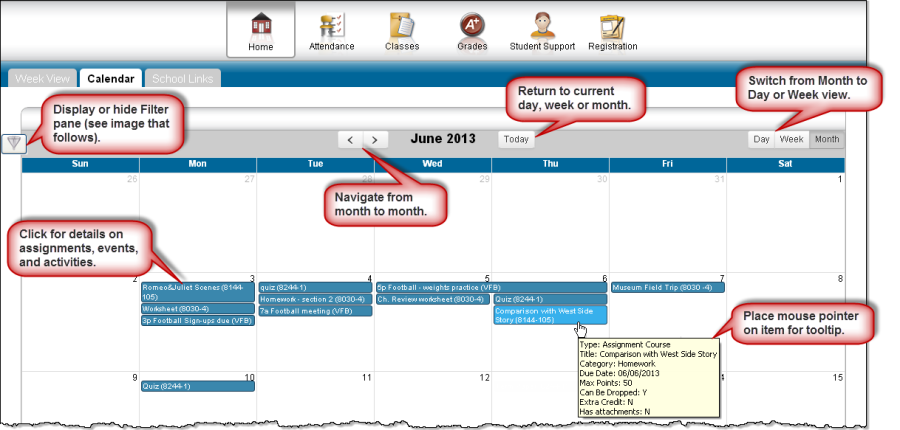
The Calendar page provides a month view of the following information on your student:
-
Class Assignments
-
Class Events
-
Activity Events
To display the Calendar page, click 
Customize calendar information
-
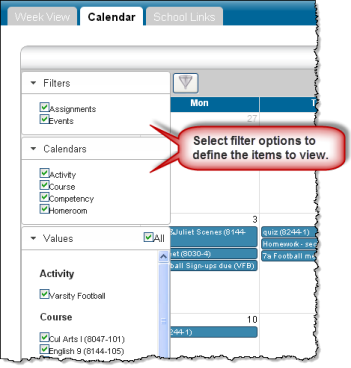
To hide or display the Filter pane, click the

Filter icon.
-
To include or exclude information on the calendar, check or uncheck the appropriate boxes in the Filter pane on the left.
-
To collapse the pane's Filters, Calendars, or Values section, click the section's

down symbol. To expand a collapsed section, click the section's

up symbol.
Change calendar views
-
To display other months, use the

arrows to navigate forward or backward a month at a time.
-
To display the week view for the current week, click Week. To display other weeks in the calendar's week view, use the
arrows to navigate forward or backward a week at a time.
-
To display the day view for the current day, click Day. To display other days, use the
arrows to navigate forward or backward a day at a time
-
To return to the current month, week, or day in the above views, click Today.